a C90 implementation of PYRDLE
| dosbox | ||
| img | ||
| include | ||
| src | ||
| wordlists | ||
| .clang-tidy | ||
| .editorconfig | ||
| .gitignore | ||
| build.sh | ||
| CMakeLists.txt | ||
| DOS_BUILD.md | ||
| Makefile | ||
| README.md | ||

CORDLE - The C90 Version of Wordle
A C90 implementation of the famous word game Wordle. I originally wrote this in Python, and decided to rewrite it in C90, to remediate myself, and to have a project I could work with in my old copy of DOS TurboC. Feel free to do whatever you like with it.
Requirements
Unix/Linux/macOS
- C90 compliant compiler (gcc recommended)
- ncurses library
- GNU Make
DOS
- DJGPP or Borland C compiler
- PDCurses library
- GNU Make (for DJGPP)
See DOS_BUILD.md for detailed DOS build instructions.
Build
Using Make (Recommended)
$ make
This will:
- Compile all source files with C90 compliance flags
- Create the
cordleexecutable inbuild/ - Copy wordlists to
build/wordlists/
Alternative: Using build.sh
$ ./build.sh
Building application.
Compile successful. Copying wordlists...
Build completed.
Other Make Targets
$ make help        # Show all available targets
$ make clean       # Remove build artifacts
$ make rebuild     # Clean and rebuild from scratch
$ make install     # Install system-wide to /usr/local
$ make uninstall   # Remove installed files
Install
System-wide Installation (Unix/Linux/macOS)
$ sudo make install
This installs:
- Binary to
/usr/local/bin/cordle - Wordlists to
/usr/local/share/cordle/wordlists/
The game will automatically find wordlists in:
wordlists/(relative to current directory)/usr/local/share/cordle/wordlists/$HOME/.local/share/cordle/wordlists/- Custom path via
--wordlistoption
Manual Installation
Copy the binary and wordlists to your preferred location:
$ cp build/cordle ~/bin/
$ cp -R wordlists ~/bin/
DOS Installation
See DOS_BUILD.md for DOS-specific installation instructions.
Run
$ cordle --help
cordle - C90 Wordle Game

Usage: cordle [OPTIONS]

Difficulty Levels:
  --easy       Common everyday words (default)
  --medium     Standard vocabulary
  --hard       Challenging words

Word Categories:
  --techy      Technical and scientific terms
  --literary   Literary and archaic terms
  --cultural   Cultural and international terms
  --full       Complete dictionary

Custom:
  --wordlist FILE   Use custom word list

Examples:
  cordle --easy
  cordle --techy
  cordle --wordlist mywords.txt
After Installation
If installed system-wide, run from anywhere:
$ cordle
$ cordle --medium
$ cordle --hard
Screenshots
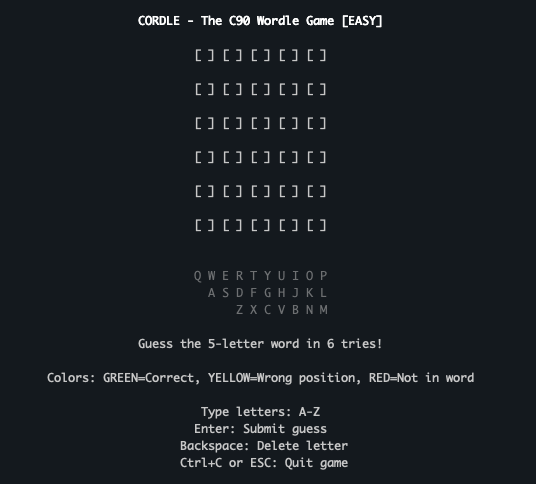
New Game
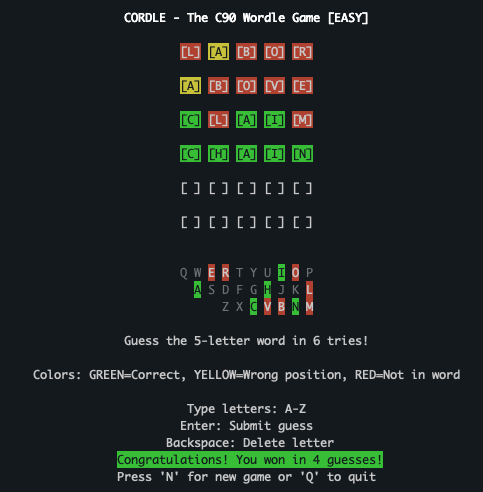
Win Game
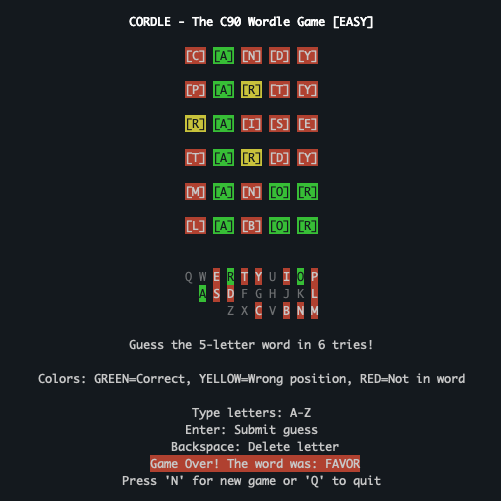
Lose Game